Come On In...Welcome to my blog entry about Destiny Quest!
Destiny Quest is an online catalog that houses every book owned in my school library.
As a teacher, I use this resource to find books that are available for check out in our school media center. Before I begin teaching a unit of study, I access Destiny Quest to find books that relate to my unit of study. For example, last week I was teaching about Black History month, so I was able to login to Destiny Quest to see what books were available. One cool feature is that it lets me know if the book is "IN" or "OUT". Do you know how much time that saves me? Since I'm a visual learner, I love the fact that Destiny displays the book covers. I use the "My List" feature to drop and drag book titles, which helps me create a resource of book titles for future use. Destiny also has ebooks! My students love when I project an ebook on the white board, because they know that I'm going to choose someone to read the book out loud to the class. The ebooks allow me to connect with my 21st Century students, who are reading books on their Nook or Kindle.
Parents and students can also access Destiny Quest from any computer with reliable internet connection. They can view every book that is available for check out in our school library. Most parents and students use this wonderful resource to select AR books. Destiny displays title details, call numbers, AR levels, awards, and more. Students can also create a "My List" bookshelf in order to make a resource list.
The best thing about Destiny Quest is that it's easy to use. The kid-friendly interface and design makes finding just the right book easy and FUN!! To check out this amazing resource and login as a guest, click here. Oh, before you begin, use my Destiny Quest instructional handout that I created for my Preparing Instructional Media class at USF. I hope you have fun browsing for books!
So, between now and next time...Ya'll come back you hear!
Sunday, February 16, 2014

Sunday, February 9, 2014
Author Visit
Come On In...
Welcome to my blog entry on how to motivate young children to read through Author visits!
I am very excited about this blog entry because I just found out that Crystal Bowman, a best-selling children's author from West Palm Beach, will be visiting our school on February 24th.
However, in preparation for her visit, I read 2 of her books to my class.
First, I read Mommy, May I Hug the Fish.

Then, I read Otter and Owl Set Sail
from the Otter and Owl
I Can Read Series.

I look forward to blogging about her visit in a couple of weeks (I'll post pictures too), but in the mean time read more about Crystal Bowman on her website.
So, between now and next time...Ya'll come back you hear!
Sunday, February 2, 2014
Celebrating AR Success!
Come On In...and welcome back to my next blog entry!
Today I will share how I reward students who meet their AR goal.
Does the word party, make you feel happy or excited?
Well, to children ages 6 to 7, the word party brings squeals of delight! So, students who reach their individualized AR reading goal by the end of each quarter, can't wait until PARTY TIME!
Our 1st quarter AR party, was based on the book... If You Give a Cat a Cupcake, by Laura Numeroff.

After reading the book, the students enjoyed decorating their very own cupcake with toppings of their choice. Take a look at the pictures below, and you will see how something as simple as decorating and eating a cupcake can motivate children to read!


At our 2nd quarter AR party, students enjoyed a picnic with popsicles, and our 3rd quarter AR party is coming up in March, where students will enjoy a movie with popcorn. For our final AR Party this year, all students who meet their AR goal will participate in WATER DAY!!
As you can see, motivating students to read is easy with a little party, and those reluctant readers, well... they find out that reading is FUN after all.
To find out more about Accelerated Reader, and to learn about what kids are reading, along with resources on how to build successful readers, visit this link.
Next time, I will blog about Author Studies and how they foster a love for reading!
So, between now and next time...Ya'll come back you hear!
Sunday, January 26, 2014
Setting AR Goals
Come On In...
Welcome back to today's post, where I want to share with you the importance of setting AR goals. Setting obtainable AR goals is the single most important motivating factor behind the success of the AR program.
Before I begin, let me back up to remind you that I talked earlier about a student's ZPD (Zone of Proximal Development) and how once that is established, they begin reading books that are in their level. So, after the ZPD has been established, students select AR books from our Media Center that interest them, then take an AR quiz which checks for comprehension of the book just read.

The students names are listed with their ZPD, and grade-equivalency. Then, I go in to select a suggested amount of time for reading practice. For most students, I suggest 15 to 20 minutes per day of independent reading practice. So, after I make the selections, the software combines the grade equivalent score, along with the suggested amount of time for independent reading practice to calculate the goal. The goals are individualized based upon their grade-equivalency and the suggested amount of time for daily reading practice. For example, low-ability readers may have a goal of 4 points, whereas high-ability readers could have a 12 point goal.
Students must select books that are in their reading range to score points. Most first grade level books are worth 0.5 points, however higher level books might be worth 22 points (that would be large chapter books). So, in order for a student to earn 1 point in first grade, they would need to score 100% on 2 books.
Students love reaching their goals, and to help motivate them, the AR software has reports, and a visual flower that fills up each time a child moves closer to their individualized goal.
In my classroom, I use a bulletin board to help students keep track of their AR progress. This year, our classroom theme was frogs and toads, so I created a board titled,"Reading Is Toad-ally Cool" where the student's frogs jump around to each log.
Wow, that's a lot of information, however it's much easier than it may sound. The students love watching their frogs LEAP around the pond until they hop onto the 100% log.
In my next blog entry, I will share with you how I reward students who meet their individualized AR reading practice goals.
So, between now and next time....Ya'll come back you hear!
Welcome back to today's post, where I want to share with you the importance of setting AR goals. Setting obtainable AR goals is the single most important motivating factor behind the success of the AR program.
Before I begin, let me back up to remind you that I talked earlier about a student's ZPD (Zone of Proximal Development) and how once that is established, they begin reading books that are in their level. So, after the ZPD has been established, students select AR books from our Media Center that interest them, then take an AR quiz which checks for comprehension of the book just read.
Now, back to goal setting!
lt's easy to set individualized reading goals with the AR Goal calculator that is linked into the AR software.
This is a Screenshot of the AR Goal Calculator.
The students names are listed with their ZPD, and grade-equivalency. Then, I go in to select a suggested amount of time for reading practice. For most students, I suggest 15 to 20 minutes per day of independent reading practice. So, after I make the selections, the software combines the grade equivalent score, along with the suggested amount of time for independent reading practice to calculate the goal. The goals are individualized based upon their grade-equivalency and the suggested amount of time for daily reading practice. For example, low-ability readers may have a goal of 4 points, whereas high-ability readers could have a 12 point goal.
Students must select books that are in their reading range to score points. Most first grade level books are worth 0.5 points, however higher level books might be worth 22 points (that would be large chapter books). So, in order for a student to earn 1 point in first grade, they would need to score 100% on 2 books.
Students love reaching their goals, and to help motivate them, the AR software has reports, and a visual flower that fills up each time a child moves closer to their individualized goal.
 |
THIS IS AN EXAMPLE OF AN AR PROGRESS REPORT.
Goal: 6.5 pts
Book Level: 3.5 (That's a first grade student-WOW)
Percent of Goal Reached: 90% (so far)
|
 |
| THIS IS A SNAPSHOT OF THE FLOWER THAT FILLS UP EACH TIME A STUDENT SCORES POINTS IN AR. THIS STUDENT HAS EARNED 1 POINT SO FAR! |
In my classroom, I use a bulletin board to help students keep track of their AR progress. This year, our classroom theme was frogs and toads, so I created a board titled,"Reading Is Toad-ally Cool" where the student's frogs jump around to each log.
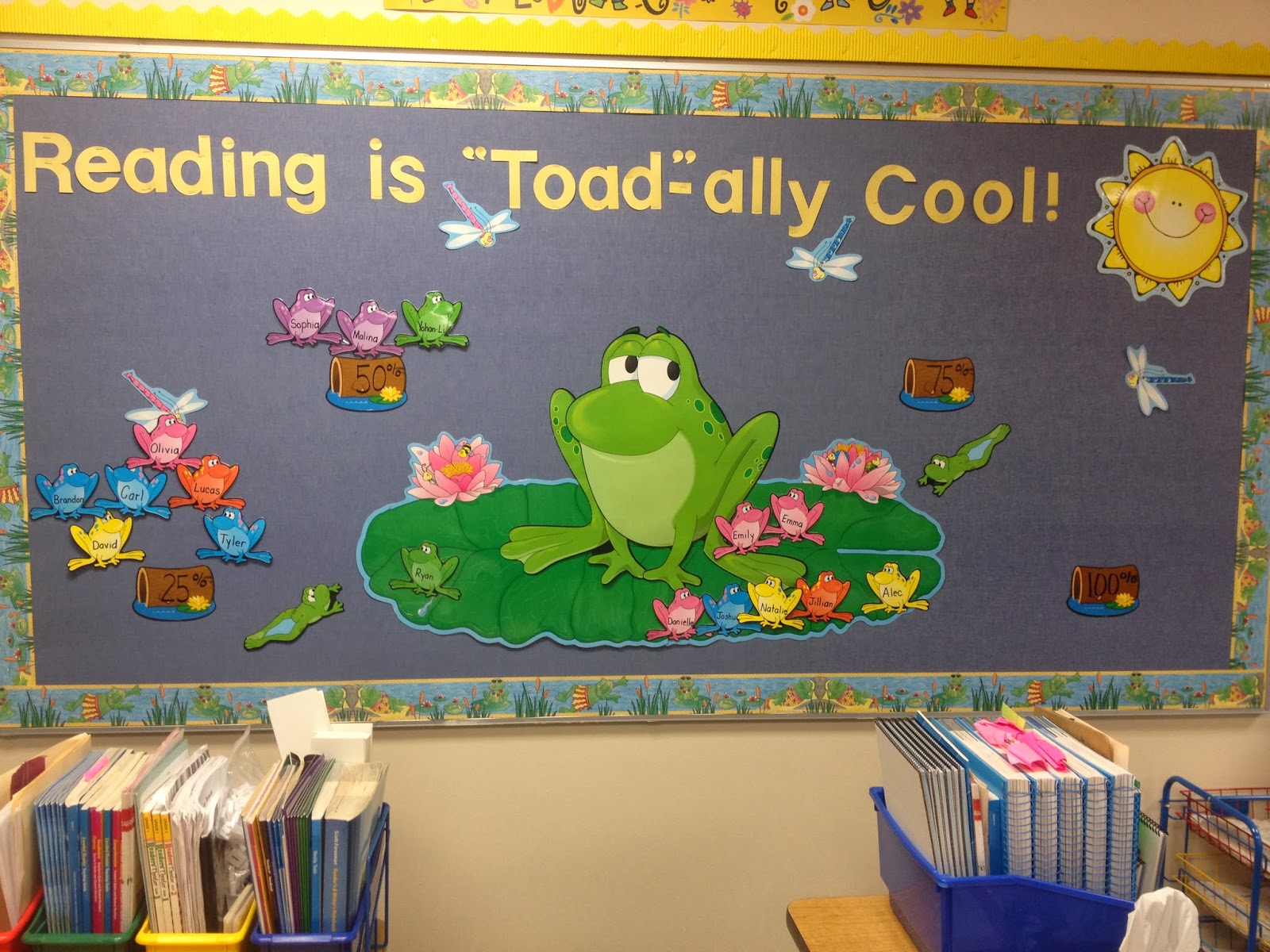 |
| MY CLASSROOM BULLETIN BOARD KEEPS TRACK OF STUDENT PROGRESS AND MOTIVATES STUDENTS TO KEEP READING. THE LILY PAD IS THE STARTING POINT. |
 |
| THESE STUDENTS HAVE MET 25% OF THEIR GOAL SO FAR THIS QUARTER. |
 |
| THESE STUDENTS HAVE MET 50% OF THEIR GOAL SO FAR THIS QUARTER. |
 |
| EVERY STUDENT WANTS THEIR FROG TO LEAP TO THE 100% LOG! THIS IS ONE MOTIVATING FACTOR OF THE AR PROGRAM! |
Wow, that's a lot of information, however it's much easier than it may sound. The students love watching their frogs LEAP around the pond until they hop onto the 100% log.
In my next blog entry, I will share with you how I reward students who meet their individualized AR reading practice goals.
So, between now and next time....Ya'll come back you hear!
Monday, January 20, 2014
Accelerated Reader
Come On In...and welcome to my next blog entry where I want to share about the highly motivational reading program called, Accelerated Reader. This software program is used across the country to motivate students to enjoy the love of reading. Today, I want to explain how Accelerated Reader works in the classroom.
First of all, at the beginning of the school year and periodically throughout the year, students take a computerized reading assessment. This baseline reading assessment determines a Zone of Proximal Development (ZPD) to establish a student's independent reading level. The independent reading level, or ZPD, is individualized to ensure that students are reading books that are "just right" for them, not too easy, and not too hard.
Once a ZPD has been determined, then students select and read books from our School Library Media Center, or Public Library, that are in their independent reading range. When a student finishes reading a book, he or she takes an AR reading practice practice quiz in the classroom, or in the School Media Center. The quiz assesses the general comprehension of the book just read. Some students enjoy taking their quizzes on the classroom computer, while others enjoy using the iPad.
Students enjoy receiving immediate feedback on their quizzes, and meanwhile, the AR software keeps track of the results, and generates reports. In my classroom, when a student scores 100% on an AR quiz, they can pick a candy or a sticker from the treat jar.
I am so thankful that our school purchased the AR reading software program, because I can't imagine my first grade classroom without it. I have seen this program motivate even my most reluctant students to enjoy the practice of reading.
This entry covers only the basics of AR, so in my next blog entry, I will share with you how I set individualized AR reading goals to motivate my students to keep reading. So, ya'll come back you hear!
 |
| DAVID IS TAKING HIS AR READING PRACTICE QUIZ ON OUR CLASSROOM COMPUTER. |
 |
| DAVID PASSED HIS QUIZ! HE SCORED 100%! WAY TO GO! |
 |
| YOHAN ENJOYS TAKING HIS AR QUIZZES ON THE IPAD. |
 |
| HE DID IT! YOHAN PASSED HIS READING PRACTICE QUIZ! LOOK AT THAT SMILE! |
 |
| SOPHIA IS FOCUSING ON HER AR READING PRACTICE QUIZ! SHE READ BISCUIT'S NEW TRICK! |
 |
| BRANDON COULDN'T WAIT TO TAKE HIS AR READING PRACTICE QUIZ ON THE GREAT WHITE SHARK! |
 |
| OLIVIA LOVES USING THE IPAD TO TAKE HER READING PRACTICE QUIZZES! |
 |
| STUDENTS RECEIVE IMMEDIATE FEEDBACK WHEN THEY FINISH AN AR READING PRACTICE QUIZ. OLIVIA PASSED THE QUIZ ON HER NON-FICTION BOOK, BIRMAN CATS! |
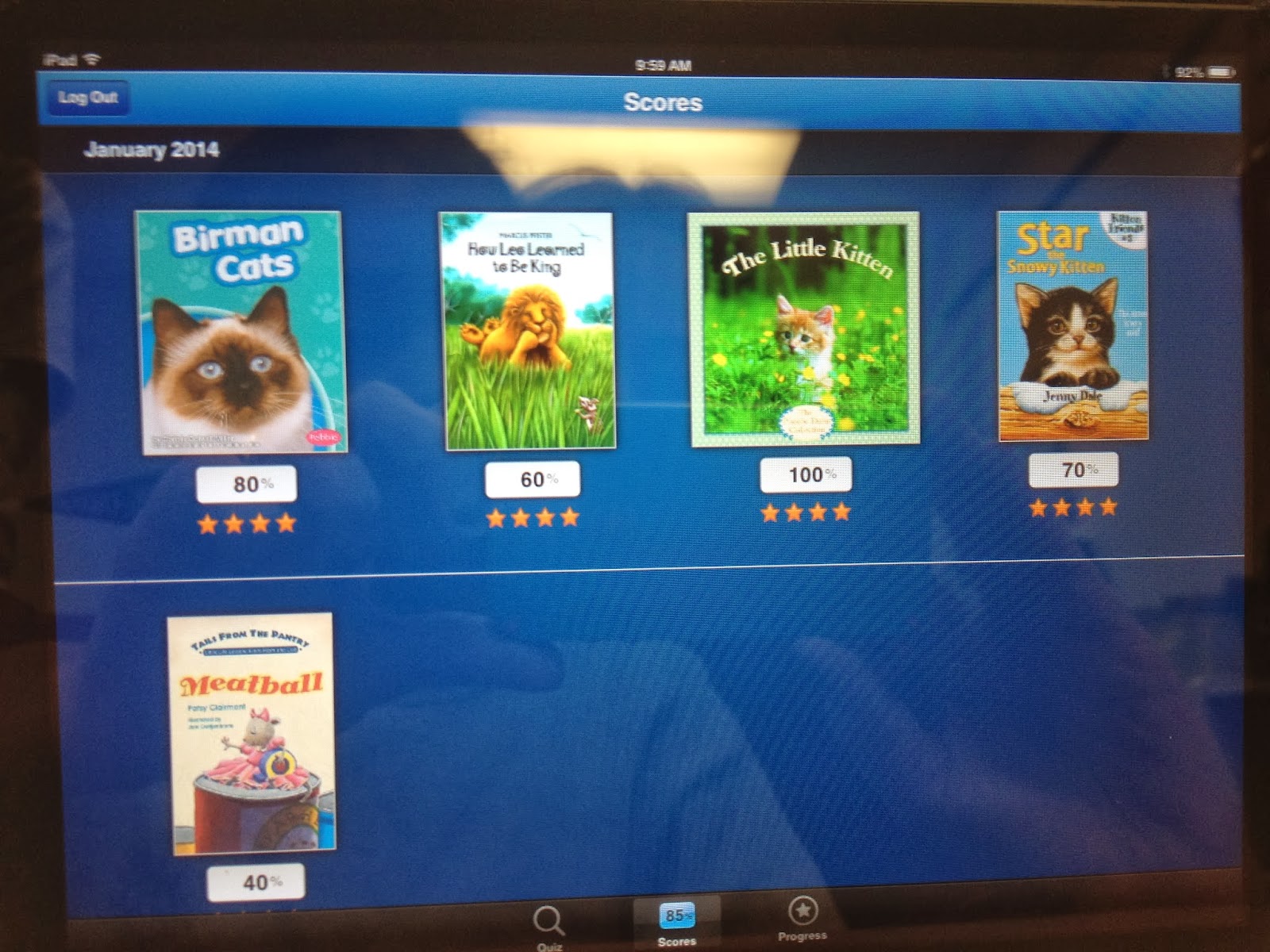 |
| THIS IS A SNAPSHOT OF OLIVIA'S AR "BOOKSHELF" IT DISPLAYS ALL THE BOOKS SHE HAS READ IN THE NEW YEAR! |
Sunday, January 19, 2014
Sunday, January 12, 2014
Partner Reading...
 |
| PARTNER READING IN FIRST GRADE |


Come On In...for my first blog entry where I would like to share with you a reading strategy that fosters a love for independent reading, it's called partner reading. In partner reading, students work together on reading fluency, word attack skills, reading comprehension, and those much needed social skills. Partner reading works best when a low, or average-level reader is paired with a high-level reader. Before partner reading can begin, the teacher must establish and model partner reading guidelines. The guidelines include: (1) this is a time for reading (not playing) (2) students must sit knee to knee or shoulder to shoulder (3) students must alternate reading every page (4) high-level students must allow low-level students time to decode words (after 10 seconds, the high-level student can assist the low-level student with the word if needed). When students are finished reading, I post a question about the story on the board, then partners work together to answer the question. I use this time to walk around and listen in to their discussions, where I often praise those students who are actively engaged in story discussions. Students thrive on praise, and they love when I comment on their answers. The benefits of partner reading are priceless, but the most valuable component is that it motivates children of all ages to read. Visit this link, from the ALA (American Library Association) to read an article on the benefits on partner reading. Well, I hope you enjoyed learning about a reading strategy that can be used in the classroom or a school library, and I can't wait to enter my next post about the highly motivational reading program, Accelerated Reader. Ya'll come back now, you hear!
Subscribe to:
Posts (Atom)